Continuous Deployments with DroneCI
Problem
Everytime a user wanted to deploy something to a testing server, he/she had to ssh into a cloud machine, pull the branch and then run a script from there. The script would build image and push them to a registry. It also pushes the image metadata to a a github repo. ArgoCD was connected to that github repo. ArgoCD would then deploy the same to k8s. If you pushed your code 10 times, you had to ssh into the server 10 times and manually deploy it.
Solution
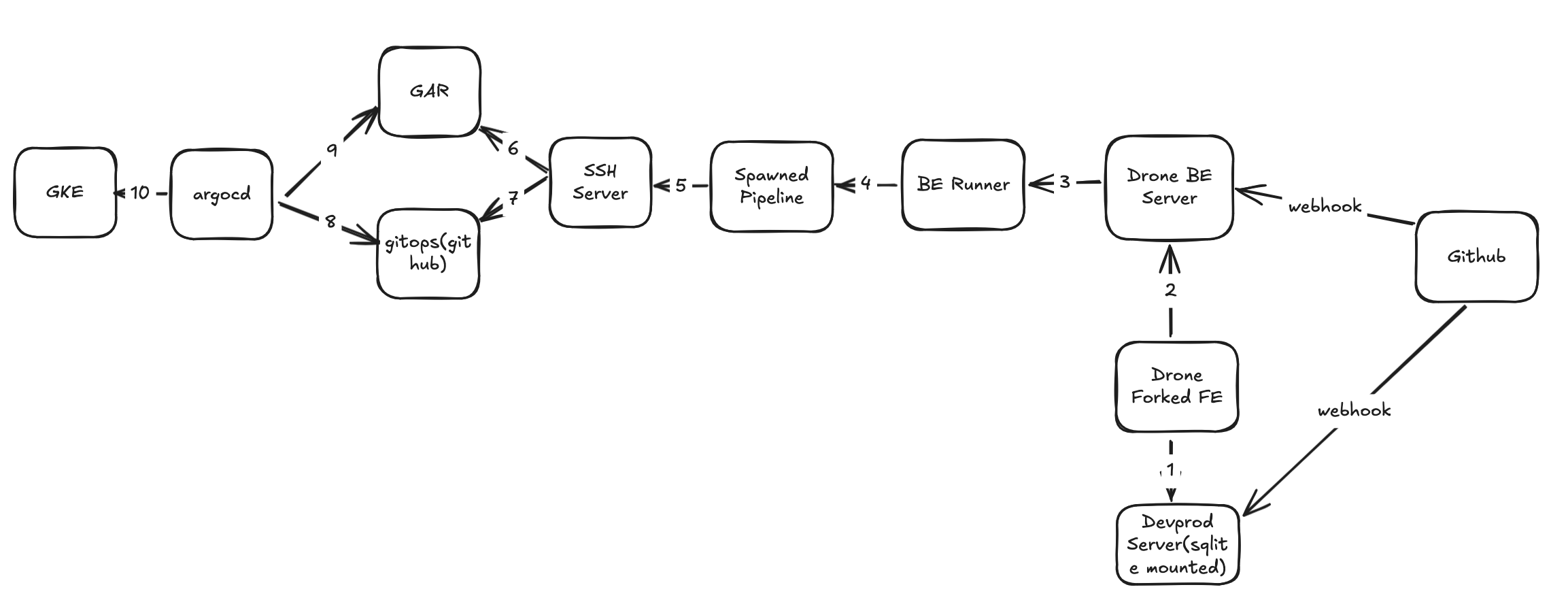
DroneCI is a continuous integration and delivery platform that allows you to automate your build. The problem was that you don’t have a way to configure UI in such a way that the testing servers and the branches would appear as dropdown. User has to manually type the branch name and server name. We forked the DroneCI frontend, hardcoded the server names and connected it to devprod server which would send branches. We added a webhook on github repo such that whenever a branch is pushed, it would hit devprod server. In devprod server, we just wrote an API which saves the branch names in sqlite. So now we have a UI where user can select the branch and server from dropdown and click deploy.
Drone BE Server is attached with sqlite as db. It stores information about builds, users, repos etc. It is responsible to tell clients about initiation of new builds. Backend runner is responsible for continuously polling the drone BE server for new builds. If it sees a new build, it will start a new pipeline. Pipeline has several steps. We configured it in such a way that it would ssh into the cloud machine(ssh server) and trigger the deployment script. We also maintained what all branches were deployed to which server in a file in ssh server. If user pushes a change in a branch which is already deployed, the following will happen. Github tells drone server via webhook that someone has pushed a new commit to a branch. Drone Server publishes a new build can be picked up by a runner. Backend runner picks the new build and starts executing the pipeline. The script in ssh server is written in a way that if no server is specified, it will check the file where branch <–> server mapping is present and deploy accordingly. Now, instead of deploying code 10 times manually, you just need to trigger the build once via Drone UI.