An intro to Public Key Infrastructure
Motivation
When I connect to a website, I see a padlock that says “Your connection is secure”. I have some idea about HTTP, HTTPS, SSL, TLS, public key, private key, certificates but I can’t connect them together. Recently, I was doing a K8s cluster migration from GCP to Azure, the code(gitops) was using cert-manager to attain certificate from “let’s encrypt”. This forced me to wrap my head around all the above. This will serve as a note for me in the future.
Encryption
The idea of encryption is to “try to hide” the data from everyone except the sender and receiver. Think of it like keeping a message in an lock box, locking it and sending it to the receiver. The idea is to ensure that the message is hidden from the people who are involved in- between. It possible to pick the lock and see the message though but it get’s harder if you are using stronger or unknown locks.
There are two types of encryption.
- Symmetric Encryption - Encryption and decryption key is same
- Asymmetric Encryption - Encryption and decryption key is different; inverse of each other
Asymmetric Encryption
As described above, both sender and receiver has different key and both are inverse of each other. Let’s call them K1 and K2. If I encrypt the data with K1, it can only be decrypted with K2 and if I encrypt the data with K2, it can only be decrypted with K1.
In real world, they are named as public and private key. For confidentiality, data is encrypted with the recipient’s public key and decrypted with their private key. You might have heard of RSA, ED25519, ECDSA, etc. All of them are built on top of asymmetric encryption.
Assymetric Encryption is safer but slower than symmetric encryption. HTTPS uses a combination of both to make best use of both worlds. We will see that in few minutes.
Digital Signature
Problem Statement: One of your friend sent you a doc. How do you verify that it was sent by him? Assume that you are not using any security layer.
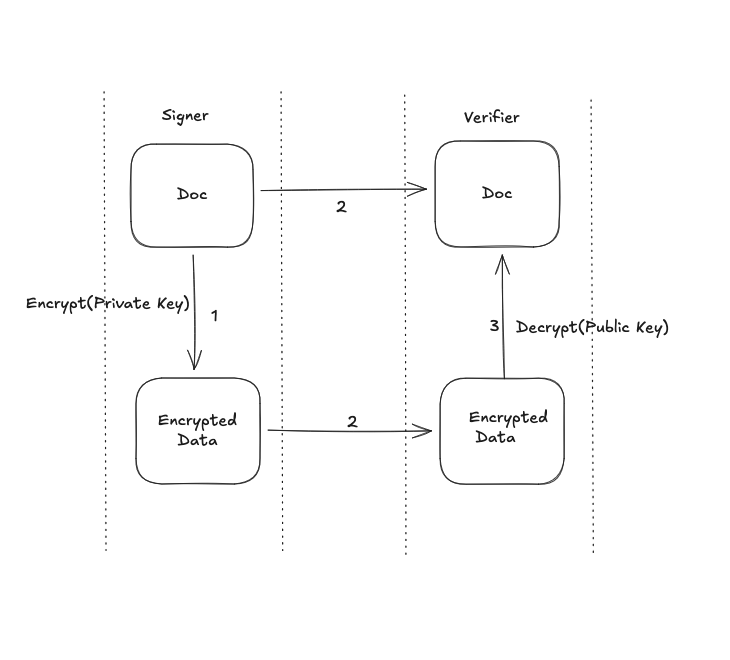
Solution: Encrypt the doc with your private key, send the doc and encrypted data to your friend. If your friend can decrypt the doc using your public key and it matches with the doc that you sent, it proves that the doc was indeed sent by you. Because you can only have your private key.
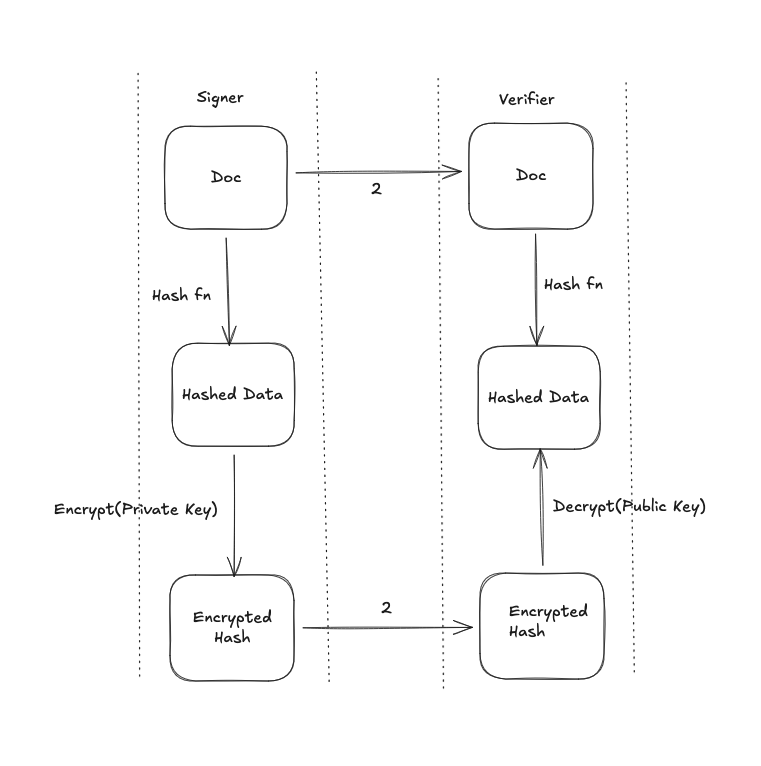
The problem with the above approach is that asymmetric encryption for big docs is a bit expensive. In practice, we hash the doc and then encrypt the hashed doc with our private key. The result is a “digital signature”. We send the digital signature, hashing algorithm used and the doc to the other party. The other party hashes the doc with same hashing function, decrypts the signature using public key and then compares both object. If it’s same, it proves the doc was sent by you.
Certificate
It is a digital document that binds a public key to an entity’s identity(person, device or organization) ie. Certificate = Identity + Public Key. In general, certificates are digitally signed by a certificate authority so that third party can trust the certificate.
Certificate Authority
Certificate Authority is an entity who signs the certificate using it’s private key by verifying the identity of the entity who is requesting the certificate. The signature can be verified by using CA’s public key. All the browsers come with set of CA that it trusts. They are called root CA.
Chain of trust
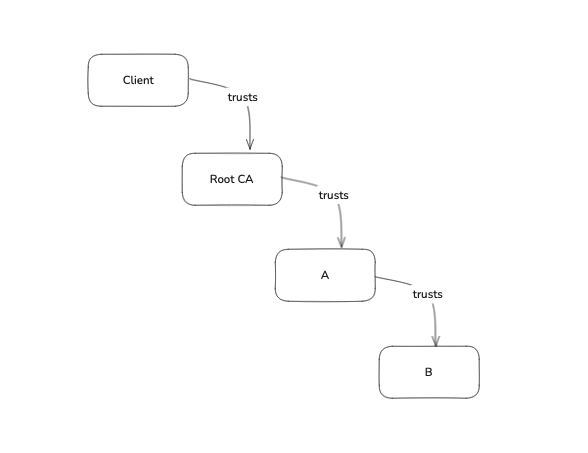
It’s possible that the certificate was not signed by one of the root CA’s. How can a browser trust an unknown entity’s signature? Well, it can based on chain of trust. If root CA trusts A, A trusts B, it means root CA trusts B and we trust B as we trust CA.
How client verifies the certificate presented by the server?
- Say, we are visiting a website called
foo.com. - Client sends a request.
- Server presents the certificate.
- Client checks if the certificate was signed by root CA or one of the CA’s that it trusts directly or indirectly. If yes, the signature is verified by browser and the connection is established.
Self signed certificate
This type of certificate is signed by the entity who generated the certificate. It can only be used when both parties trusts each other. Eg.- Dev environment.
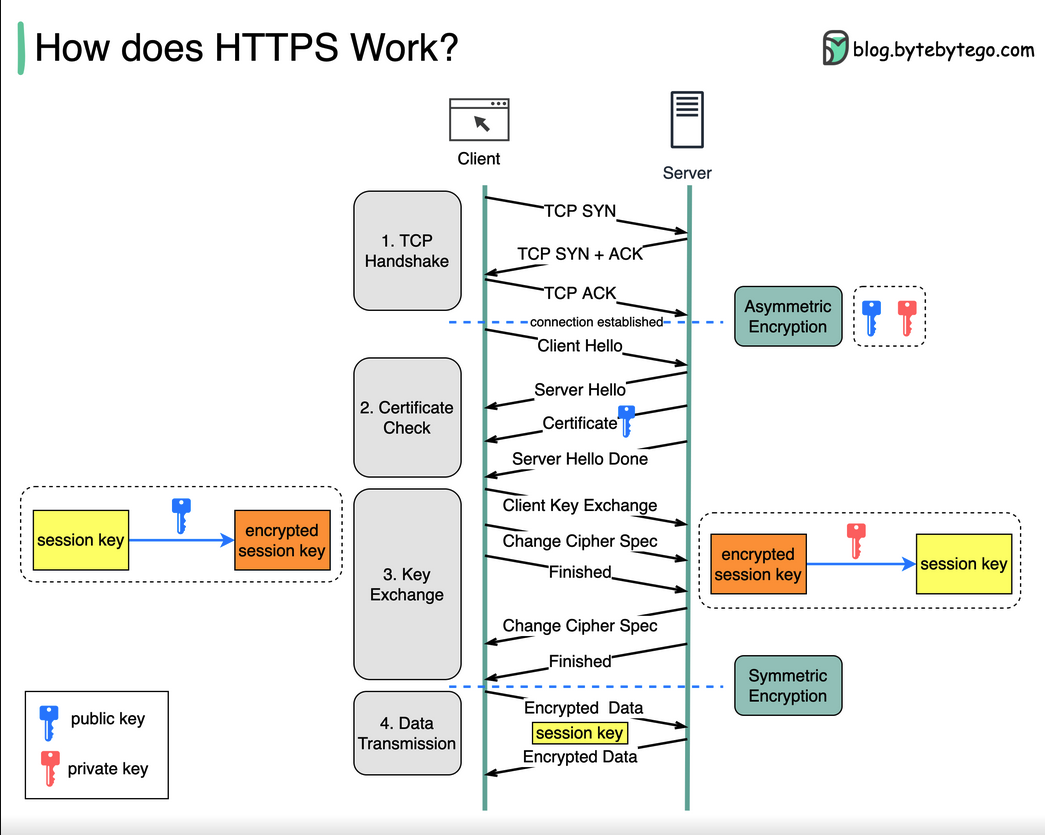
SSL/TLS Handshake
Note:
- TLS is the newer version of SSL
- Symmetric Encryption is used for encrypting messages as it’s cheaper than assymetric encryption but the exchange of keys happens on top of assymetric encryption.
Communication b/w server & CA to get the certificate
- Asymmetric key pair is generated on the server (public key + private key).
- Server creates and signs a CSR (Certificate Signing Request) containing its public key, domain name, and metadata. The server signs the CSR with its private key to prove it owns the corresponding public key.
- CA verifies the CSR signature to confirm the server possesses the private key.
- CA initiates a domain validation challenge (DNS/HTTP) to verify the server controls the domain. Example: placing a token at /.well-known/acme-challenge/[token].
- CA signs and issues the certificate - Upon successful validation, the CA creates a certificate binding the public key to the domain/identity and signs it with the CA’s private key.
- Server uses the certificate in TLS handshakes to prove its identity to clients.
Refs:
- https://youtu.be/s22eJ1eVLTU?si=Nq43sT1Z5UU-TV9-
- https://youtu.be/j9QmMEWmcfo?si=J9JFUgTrf9n-FqvW